Great keynotes by ScottGu, ScottHanselman, and IE team, MIX is amazing conference and always amazes me.
Great job guys!
http://live.visitmix.com/
Showing posts with label Microsoft. Show all posts
Showing posts with label Microsoft. Show all posts
Tuesday, April 12, 2011


Thursday, August 5, 2010
My adventures in WPF - Intro to WPF Series
This will be a first post in the series of articles around WPF (Windows Presentation Foundation). I will be using examples of real work in an example format of the challenges I have faced when working with this technology. I feel that a blog series devoted to understanding WPF is needed because it is a very different platform for .NET Developers and when moving to WPF/Silverlight there is a steep learning curve whether people admit it or not. Just because you know Microsoft .NET does not mean that you will be sufficient at WPF/Silverlight which I find so many business people think is true.
I will also be posting reference articles that I feel have helped me along the way to understand this new Microsoft technology. I will admit that WPF is a rewarding technology to use and if used correctly can create amazing applications for businesses and individuals. However, with any new technology there are always critics and skeptics but I am here to blog that its possible to learn this technology and I am going to show you how! Stay tuned for my first post about "diving into databinding".
I will also be posting reference articles that I feel have helped me along the way to understand this new Microsoft technology. I will admit that WPF is a rewarding technology to use and if used correctly can create amazing applications for businesses and individuals. However, with any new technology there are always critics and skeptics but I am here to blog that its possible to learn this technology and I am going to show you how! Stay tuned for my first post about "diving into databinding".
Saturday, December 19, 2009
Tips and Tricks of Technical Interviews
[Intro]
I am sure everyone who has ever had a technical interview will be able to benefit from this article. I am going to explain some tips and tricks of technical interviews and how it can help you during your interviews. To get some context around this subject we need to clarify what we mean by 'technical interview'. The scary part is that this could be almost anything in the computer world. Also, just to be clear that this post is generally about Software Engineer/Consultant/Programmer positions that are built on Microsoft's .NET Framework. However, even though this is product specific, the concepts apply to the Information Technology industry. Fear not however, I will give you some good tips on how to approach technical interviews from an interviewee and interviewer perspective. Let me get started with how the process works a majority of the time.
[First Contact]
Yes. First contact, in other words, the first time a recruiter, job-hunter, hiring manager, head-hunter, whatever you would like to call them contacts you over the phone or through and email. What you can expect out of most recruiters is to talk to you about your application, resume, job history, interest, salary, and location. What I recommend in this first part of the interview process is to be very polite, upbeat and respectful. However, this is not always easy because you never know what to expect. Just remember that the recruiter is trying to get an idea of what kind of person you are and if you are going to line up with the position they are trying to fill so as interviewers we want to be as upbeat and polite as possible.
As the recruiter tries to get a feel for what kind of worker you are there are some things you might not want to reveal to them. The most important thing is salary expectations. I feel that if you prolong this you can usually get the recruiter to let you know the salary range. Sometimes, if you are being hired for contract work and not salary, they might just tell you right away. However, if you are negotiating a salary you want to be sure to do your homework on the area through sites like:
[First Technical Interview]
Wow, lots of information! I am going to congratulate you if you made it this far! A majority of folks don't because they really don't know core concepts and get stuck on the basic interview questions. However, since your this far keep reading! Since you are here you must know enough to have a chance at the job and what comes next in most interviews is a technical/behavioral/personality type of interview if that makes sense. It almost every interview I have ever had this always happens. Here are some things to be sure to practice up on:
[Final Interview/Offer]
If you get a call back for an "in-person" or "final interview" this is a very good thing and I want to congradulate you for your success. Most people don't get here. Anyways, here are some things to keep in mind in this stage of the game:
So, when you get the phone call about the offer or counter-offer just relax, think, and be cautious about what you say. Remeber that no matter what they say, no matter how good the offer is, you always should say "Thank you for the offer but can I take some time to look it all over before I make my decision?" If they try to hard-ball you by saying you have to tell them right now, they are bluffing, so stand tuff and just say you always take your time when making important decsions and reasure them that you are interested and want to look everything over 1 last time. Also, remember the recruiter will try their best in this stage to get you for the cheapest amount possible. Just think about it, the cheaper a company can find a valuable resource, the better off they can increase their bottom line! If the salary is what you want, you can gracefully accept the position at this point. Anyways, I can only give you pointers in this area because at the end of the day you will figure out your own way of negoiating because everyone always does. I hope this helps.
The same thing goes for Benefits, Training, and Re-location. You already know that the firm has an interest in bringing you on-board so you have the upper-hand to ask for better benefits, increased training, comparable vacation time, and re-location, if needed. A large of amount of interviewees out there have no idea of how to handle negoiations when getting hired by companies. Most of them only care about salary but as you can see there are other benefits you can gain with a little bit of negoiating. Again, I hope this helps.
[Wrap-Up]
I hope my experiences in this area can benefit you when you encounter these situations. Just remember to be upbeat and passionate when you first time because this sets the tone for the rest of the interview process. Next, always make sure you do your homework about the position you are applying for. Find out what the market-rate is for a particular position on sites like http://www.glassdoor.com/ . You can find reviews from other employees , past & present. Check the cost of living in the area you are looking to work in. As for the technical interviews, do your homework as well by reading about common algorithims, object-oriented techniques, and be up-to-speed on present & up-coming technologies. Remember that you if you make it to the end of the interview process you have a lot more bargaining power than you will ever have so keep that in mind. Finally, if you end up getting the job and everything that you wanted, then reading this blog post was beneficial for you and you should pass it on to a friend! Good luck interviewees and feel free to comment your experiences if you like.
I am sure everyone who has ever had a technical interview will be able to benefit from this article. I am going to explain some tips and tricks of technical interviews and how it can help you during your interviews. To get some context around this subject we need to clarify what we mean by 'technical interview'. The scary part is that this could be almost anything in the computer world. Also, just to be clear that this post is generally about Software Engineer/Consultant/Programmer positions that are built on Microsoft's .NET Framework. However, even though this is product specific, the concepts apply to the Information Technology industry. Fear not however, I will give you some good tips on how to approach technical interviews from an interviewee and interviewer perspective. Let me get started with how the process works a majority of the time.
Yes. First contact, in other words, the first time a recruiter, job-hunter, hiring manager, head-hunter, whatever you would like to call them contacts you over the phone or through and email. What you can expect out of most recruiters is to talk to you about your application, resume, job history, interest, salary, and location. What I recommend in this first part of the interview process is to be very polite, upbeat and respectful. However, this is not always easy because you never know what to expect. Just remember that the recruiter is trying to get an idea of what kind of person you are and if you are going to line up with the position they are trying to fill so as interviewers we want to be as upbeat and polite as possible.
- http://www.glassdoor.com/
- http://www.salary.com/
- http://www.bestplaces.net/COL/
- http://www.payscale.com/
All these sites will give you a good idea of what to expect when you are negotiating salaries for positions. It will also give you an idea of what to expect in the area/location you are applying. In addition to salary, when speaking with the recruiter try to get as much information possible about the position, such as project length, type of work, technologies being used, type of environment(in-house, consulting, etc.). This will give you a better idea when you are trying to determine how much you are worth compared to the position you are going after. In the next section, I am going to talk about what happens if this goes well for you and what you can expect.
[First Technical Interview]
If you have made this far then at least you didn't screw up the first part! This is going to be a harder to explain but I can give you the best of my knowledge. First off, depending on what type of company you are dealing with the will either be phone-based, computer-based, or in-person. Most of the time the first interview is either phone-based or computer-based. If you are dealing with a phone-based interview , here is what you can expect on the first interview:
- Most of the time the interviewer will ask you about your project experience
- Most of the time the interviewer will ask you about the types of technology you have worked with and for how long
- After the interviewer is done asking you the basics about your current role and what kind of work you have be doing they will usually start with a list of technical questions in 3-4 general areas.
- The areas are : Object-Oriented Programming Concepts, Database Concepts, Web Concepts, and then drill into a deeper subset of whatever technology experience they are trying to figure out if you know
- Some companies even go as far as to build systems to generate these types of general technical questions
- If you can get your hands on the magical PDF put together by a few programmers a few years back you can do extremely well with this interview
Just remember that I cannot give you the actual answers on this blog but a quick search on the topics lists above and you can get an idea of what to expect. If you pass this interview, usually within a few days the recruiter will call you back and talk to you about what's next in the process. If the company is small, sometimes they may require you to do a computer-based screening test. Most of the time this consists of more detailed questions about the particular technology you are working with. If the company is medium-to-large they are often going to require another technical interview and that is what we will talk about next.
[Second Technical/Behavioral Interview]
- Be ready to explain your resume and every project you were apart of end-to-end
- Be ready to explain how you solved a particular problem in the past on one of your projects
- Be ready to explain how you overcame an issue with a manager/customer/co-worker
- Be ready to interpret business value of technology to a hiring manager/technical lead
[Final Interview/Offer]
If you get a call back for an "in-person" or "final interview" this is a very good thing and I want to congradulate you for your success. Most people don't get here. Anyways, here are some things to keep in mind in this stage of the game:
- Salary Expectations
- Benefits/Vacation
- Training
- Re-location
So, when you get the phone call about the offer or counter-offer just relax, think, and be cautious about what you say. Remeber that no matter what they say, no matter how good the offer is, you always should say "Thank you for the offer but can I take some time to look it all over before I make my decision?" If they try to hard-ball you by saying you have to tell them right now, they are bluffing, so stand tuff and just say you always take your time when making important decsions and reasure them that you are interested and want to look everything over 1 last time. Also, remember the recruiter will try their best in this stage to get you for the cheapest amount possible. Just think about it, the cheaper a company can find a valuable resource, the better off they can increase their bottom line! If the salary is what you want, you can gracefully accept the position at this point. Anyways, I can only give you pointers in this area because at the end of the day you will figure out your own way of negoiating because everyone always does. I hope this helps.
The same thing goes for Benefits, Training, and Re-location. You already know that the firm has an interest in bringing you on-board so you have the upper-hand to ask for better benefits, increased training, comparable vacation time, and re-location, if needed. A large of amount of interviewees out there have no idea of how to handle negoiations when getting hired by companies. Most of them only care about salary but as you can see there are other benefits you can gain with a little bit of negoiating. Again, I hope this helps.
[Wrap-Up]
I hope my experiences in this area can benefit you when you encounter these situations. Just remember to be upbeat and passionate when you first time because this sets the tone for the rest of the interview process. Next, always make sure you do your homework about the position you are applying for. Find out what the market-rate is for a particular position on sites like http://www.glassdoor.com/ . You can find reviews from other employees , past & present. Check the cost of living in the area you are looking to work in. As for the technical interviews, do your homework as well by reading about common algorithims, object-oriented techniques, and be up-to-speed on present & up-coming technologies. Remember that you if you make it to the end of the interview process you have a lot more bargaining power than you will ever have so keep that in mind. Finally, if you end up getting the job and everything that you wanted, then reading this blog post was beneficial for you and you should pass it on to a friend! Good luck interviewees and feel free to comment your experiences if you like.
Tuesday, September 22, 2009
How to get started with programming - Microsoft Ramp Up Program
If you are new to programming or just getting back into the mix you have to check out Microsoft's Ramp Up program. This new offering from Microsoft offers an abundance of knowledge, training, and video tutorials for beginners, intermediates, and advanced users for free. I have personally signed up for the offering by creating a Windows Live ID logging into the website. In a short amount of time I have been able to get up-to-speed in several technology areas that I needed help with. The content is straight-forward and simple.
From the initial onset, Microsoft is really trying to help customers get a grasp of their products for free. I highly recommend this for all programmers whether you are a novice or easoned veteran this site offers a great wealth of knowledge. They offer many different types of learning paths and topics. Topics include: Silverlight Development, Share Point Development, Java Developers: Intro to Microsoft .NET, PHP Developers: Intro to ASP.NET.
Take a look at the site here - http://msdn.microsoft.com/en-us/rampup/default.aspx
If this program seems like something that may interest you and you would like to get a more official training approach I would check out http://learnvisualstudio.net . I have personally used them for my .NET training in the past and it has been the best I have ever found on the internet.
From the initial onset, Microsoft is really trying to help customers get a grasp of their products for free. I highly recommend this for all programmers whether you are a novice or easoned veteran this site offers a great wealth of knowledge. They offer many different types of learning paths and topics. Topics include: Silverlight Development, Share Point Development, Java Developers: Intro to Microsoft .NET, PHP Developers: Intro to ASP.NET.
Take a look at the site here - http://msdn.microsoft.com/en-us/rampup/default.aspx
If this program seems like something that may interest you and you would like to get a more official training approach I would check out http://learnvisualstudio.net . I have personally used them for my .NET training in the past and it has been the best I have ever found on the internet.
Monday, August 31, 2009
How to setup your own mail server for free
[Some Intro]
Setting up your own mail server is something that most IT folks should know how to do. It can benefit you to host your own mail server so that you can have complete control over your email addresses and email accounts. There are several products that you can purchase to do this for you such as Microsoft Exchange Server, Sendmail, FastMail.FM, and many others.
Setting up your own mail server is something that most IT folks should know how to do. It can benefit you to host your own mail server so that you can have complete control over your email addresses and email accounts. There are several products that you can purchase to do this for you such as Microsoft Exchange Server, Sendmail, FastMail.FM, and many others.
The point of this article is to setup your own email server on Windows Server 2003 in a short amount of time and for free. I have been trying to setup my own mail server for the longest time and have always been able to receive mail but could never get it work from my home office. After about a year of trying and reading through endless blogs and newsites I have finally figured it out. There have been many articles out there claiming to show you how to setup a mail server but they all come up short. I will give you all the information you need to get started in about 15 minutes.
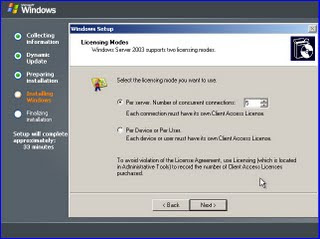


[Step 1: Install Windows Server 2003]
Setup the Windows Server with all the defaults and click the installation wizard until you are done. Once you are done installing the server, you need to add Email Services (POP, SMTP) to the server. This option is not installed by default when you first install Windows Server 2003.
[Step 2: Enable email services on the server]
To enable "Email Services" on the server you need to open up the Manage Your Server screen from the start menu. Click on the Mail Server option and click next.

Once you are here, you will be able to install SMTP service for sending and receiving mail and the POP3 service for allowing clients to connect and download their mail with an email client. Click through the next screen and accept the defaults. Once you receive the window that tells you the server is now a "Mail Server", click complete/finish and close the diaglog. The next part will talk about the configuration of the Mail Server. There are two parts to setting up the mail server, the first being the POP3 component, and the second being the SMTP component.
[Step 3: Setting Up/Configuring the POP3 component]
Now that you have the POP3 component installed, you need to setup a mail domain. The domain can be anything you want but must be a domain that must be configured in your MX record.

Once you get to this screen, go ahead and create a domain. (yourdomain.com, your domain.net, etc.) After you create the domain go ahead and create a test mailbox under that domain.

Create the email account and setup a password. This user will be added to the "Email User" group on the server and will only have permissions to access to the POP3 service and the SMTP service. For setting up the POP3 service that is all that is needed unless you need to change your InBound email port which is by default 110. If you need to change this for any reason, in the POP3 Managment window, click on properties of mail server and change the port number in the diaglog window. That is all that is needed for the POP3 service component.
[Step 4: Setting Up/Configuring the SMTP Component]
This part requires that majority of the time spent on setting up the mail server to work properly. First, we need to make sure that SMTP service is installed and is running. On the server , click Start > Adminstrative Tools > IIS Manager. Once you are here click on + on the server and make sure you can see the Default SMTP Virtual Server node.

Here is where the majority of the configurations go wrong. Make sure you follow the directions listed below. Right click on the properties of this and you will see a dialog that will have several tabs on it. I am going to explain each tab and the properties that need to be set in order to get your mail server working properly.
[Tab 1: General]
- The only setting you need to check is the port number that will be used for sending and receiving email. In the dialog, will be able to specify an IP address that will be used for the email or you can leave it as [All Unassigned]. Leave this as the default and click properties. In this dialog, you can change the port number for the SMTP server. I would recommend using 25 but if you want to use another common mail port you can change it here. In some cases, most ISPs block port 25, but check with your ISP and find out if they block port 25. If so, you may need to change this number here to 587 or another port number that they don't block.
[Tab 2: Access]
- Under access control, click details and make sure you have Anonymous Access and Windows Integrated Authentication checked.
- Under Relay Restrictions, click detail and make sure the "All Except the list below" is selected. You will still be secure by doing this in that only users who were authenticated can access and relay email through this mail server. You don't want your server being used for SPAM!
[Tab 3: Messages]
- Here you can specify the max mail message size and where bad mail will go.
[Tab 4: Delivery]
- Here you can specify the outbound message info. You want to make sure under "Outbound Security" that you have "Anonymous Access" selected only.
- Under outbound connections, you need to make sure the correct port is set based off the initial port we specified back on the properties of the SMTP server above.
- Click Advanced, then here you need to specify the fully-qualified-domain-name of your domain. (YourDomain.com). Whichever you used when you created the mail domain for the POP3 component.
- Still under Advanced , you will need to configure a smart host if your ISP blocks your IP address from sending mail over the internet. My ISP offers a free relay for SMTP/POP access , so I contacted my ISP's website and obtained the server names and placed the smtp ip/domain in the smart host field. If you forget this, the email will never be sent if you are using a Dyanmic IP address or are on a email blocklist/blacklist.
[Tab 5: LDAP]
- Skip this
[Tab 6: Security]
- This lists the user groups able to access/modify the SMTP server
Now that we have the SMTP component configured we can start testing our configurations and sending some emails. The first thing I start with to test is using the command line and telnet.
Click Start> Run> Enter "cmd.exe" and the command prompt opens. You will need to do this from the server computer and from another client computer that can access your mail server. Make sure if you mess up when typing , don't use backspaces because the mail server expects the exact amount of characters and will not work so be sure you enter the info correctly with no mistakes. If you mess up tho, no worry, just start the process over. Be careful when you type!
- Type cd\, then you should have C:\ prompt, then type - "telnet yourdomain.com [portNumberYouUsedInSMTPproperties]
- If you connected successfully, you should get a response back from the mail server that tells you the name, date, and other relevant info in the command prompt.
- Then type , "helo", this will make sure you can communicate with the mail server.
- Then type "mail from: yourMailBox@yourDomain.com" and click enter
- Then type "rcpt to:yourMailBox@yourDomain.com" and click enter
- Then type "data" and click enter
- Then type "A Test Message" then click enter
- Then type "subject: A test message" and click enter"
- Then type "body: This is test message" and click enter"
- Finally, click "." and click enter, if you did this correctly, you will see a response from mail server that says, "Email Queued for Delivery"
- Close the command window.
The first test is to check your POP3 service and see if the mail was successfully delivered to the email address you specified above. If you have a message count under that mailbox of 1 then you know it worked. The next test would be to do the same thing from another client computer that can connect to this mail server. Another test would be to send an email to an address outside of your domain. This problaly will not work because 99% of ISPs will have your dynamic IP address on a blocklist/blacklist. I will talk about this next on how to get around this.
[Step 5: Getting Around the BlockList/BlackList Issue]
[Only do this if you can't configure a smart host]
As mentioned before, all ISPs block dynamic ip addresses from sending mail because of the heavy use of spam on the internet. This is a good thing for all the users out there that actually are good internet citizens. What you will need to do is go to http://www.spamhaus.org/
Once you are here, enter your IP address into the IP address checker on the left side of the site. Once you run this , you will end up on one of the lists, click on the link provided, and follow the directions. Since your server is already setup and active, you can request to be removed from the blocklist\blacklist. Just follow the link that they provide after you input your IP address. It should take about 24-48 hours to process your request and after just check to make sure your IP is not on the blocklist\blacklist anymore and you start sending and receiving emails.
If all of the tests worked and you are not on a blocklist\blacklist anymore, all you need to do is configure your client mail programs, which should be pretty straighte forward.
[Step 6: Setting Up Client Email Program]
For this section, you have many options. You can use the default OutLook Express, Microsoft Office Outlook, Mozilla ThunderBird, and several other products that allow you to manage your email from a client computer. The simple and most easiest to use is Outlook Express.
Setting up an account is pretty simple. The first time you run Outlook Express, you will be prompted to setup and account. Follow these steps:
- Add new Email Account (POP3)
- In the wizard, enter your name for your account , this can be anything you want so you can reference later.
- Next enter your email address in the email address field.
- In the Incoming Mail Server: pop.YourDomain.com
- In the Outgoing Mail Server: smtp.YourDomain.com
- In the Account Name: YourMailBoxName@YourDomain.com
- In the password Field: password used to setup the mailbox from before
- [Optional] If you changed the ports from when you setup the original SMTP server you will need to change that here too. Click on "More Settings" or "Manually Setup Account"
- You need to make sure that for your incoming mail that you specify port 110 and for outgoing email you specify your SMTP port number. Remember that if you don't set this up correctly your email will never work.
- Once you have completed this section, click on the "Finish" button and if everything was setup correctly you should be able to connect to your mailbox and see your test message that you sent to yourself from before.
- The last test is to try to send an email to an outside domain email and then send an email from an outbound domain to your domain and verify that it works.
[Wrap Up/Conculsion]
If you followed my post, you should be sending and receiving emails like a champion! There was a good deal of information in this post and like always if you have any questions or concerns about it, feel free to leave a comment here on my blog.
Good luck and happy emailing!
Tuesday, August 25, 2009
Thoughts on starting your own consulting company
[A little precursor]
I have had a good deal of experience in the world of information technology or at least I would like to think so:) It seems that developers always lead down the same pre-defined career paths. The first path is to start out as a junior developer working your way up through a company, then becoming a senior developer and after quite some time(*time will vary based on company*) you will eventually either become a team lead or supervisor of your team. Others may choose at this point to go back and get their master's degree and go for their MBA continuing to become a project manager and then finally a development manager or somewhere in management.
So in reality, there are really 2 paths once you become seasoned professional, 1 - stay in your field and try to get to the upper-echelon of that area or 2 - Go into management, I am sure if you are reading this you are excited about that one:) However, there is one path that I left out intentionally because I think it is the best path for someone who wants to make it big.
Start your own company!
We have all heard this statement from our friends, professors, colleagues, and yes that man on TV with the ? on this hat and shirt. I feel strongly about this because starting your own company is a huge undertaking and requires if not more than all of the other path(s) experience, wisdom, and knowledge all tied together. So the real idea here is that it's the hardest and most difficult of the paths to go down and I like to think back to my 9th grade English class when we read a poem by Robert Frost, "The Road Not Taken", where the title is pretty much explains itself. I feel this way about starting my own consulting company.
My experiences
From what I have experienced here are a few things I think you need to know about starting a consulting company in general.
- A competitive advantage
- A business plan
- Knowledge of your field
- Experience as a consultant in some capacity
- A website
- Some kind of blog
- Insurance
All of these thing are my opinions and not everything you need to start a consulting company but they will definitely help and get you pointed in the right path. Some other tips I have heard were to join local user group and communities related to your expertise. These are great places to meet local professionals and industry experts. You can learn a great deal from these events for free.
In the end, with most companies and not only consulting companies is finding clients. It is by far the hardest part for the majority of entrepreneurs out there. The best way I have found is to use websites, community events, local networking events, and word of mouth. Here is quick list of what I have found.
- Websites - LinkedIn.com, elance.com, guru.com
- Community Events - INETA.org, Cleveland Dot Net User Group
- Business Forms & Documentation - LegalZoom.com, Ohio.Business.gov, you can change the subdomain for your state
- Word of Mouth - This one is up to you!
I have began to work on my own business as well. Check out www.voralityconsulting.com
to see for yourself. It's not much , but its a start!
This not an exhaustive list but a good one to get started on your way. I would like to hear about other people experiences and how they over came them. Feel free to comment on this blog.
Post your thoughts on my blog and let me know what you think about starting your own consulting business. It would be nice to hear from others that were successful in taking this path.
Monday, May 19, 2008
Speaking at the Cleveland Day of .NET
Being that it was my first presentation ever, I was a little nervous about getting up in front of 50 or so other developers and talking about LINQ to SQL. LINQ itself is not that hard to talk about from a 10,000 ft. view but where things start to get blurry is when you try to show people how things work with demos. I had spent most of my time working on getting all the powerpoint material (slides, notes, speaking material) perfect without using notecards or anything like that but what I thought would be a breeze was the code.
Obviously not, I had developed the demos about a week prior and they were all working fine then. However, when I was actually giving the demo I ran into a few problems. My Query Analyzer threw an exeception, my debugger decided to stop working, and I forgot where to go to show everyone how to implment Stored Procedures over manual LINQ code. Anyways, aside from those issues everything else I think went well. I will take what I have learned from this exeperience and make myself better for the next time. I really do enjoy speaking about technology and how it can make our lives more efficient and productive.
You can download the sample code and slides at the link below.
http://cid-e53966b765831664.skydrive.live.com/browse.aspx/Powerpoint%20Slides%20%7C0%20Code
-Josh
Obviously not, I had developed the demos about a week prior and they were all working fine then. However, when I was actually giving the demo I ran into a few problems. My Query Analyzer threw an exeception, my debugger decided to stop working, and I forgot where to go to show everyone how to implment Stored Procedures over manual LINQ code. Anyways, aside from those issues everything else I think went well. I will take what I have learned from this exeperience and make myself better for the next time. I really do enjoy speaking about technology and how it can make our lives more efficient and productive.
You can download the sample code and slides at the link below.
http://cid-e53966b765831664.skydrive.live.com/browse.aspx/Powerpoint%20Slides%20%7C0%20Code
-Josh
Subscribe to:
Posts (Atom)